Introduction
The fastest way to stop interview reschedules caused by interviewer conflicts is to set scheduling defaults, enforce load limits, and automate conflict resolution before a candidate ever sees a slot. To improve candidate experience during interview scheduling, make the process predictable, fast, and transparent, with clear confirmations, easy rescheduling paths, and fewer back-and-forth messages. At Guide, we useAria to turn those rules into an automated recruiting coordination workflow that protects both interviewer calendars and candidate momentum.
Why interview reschedules happen in the first place
Interview reschedules usually come from weak calendar hygiene, unclear availability rules, and too much manual coordination. Guide’s scheduling defaults and load settings are designed to prevent exactly that by giving admins control over daily and weekly interview limits, working hours, buffers, and load balancing, according to support.guide.co.
The most common causes are easy to spot. Interviewers get booked outside preferred working hours, back-to-back meetings leave no buffer, load is concentrated on the same people, or a decline forces a coordinator to rebuild the panel from scratch. Guide’s product language also points to OOO changes, time zone changes, and load preferences as recurring sources of reschedules, which is why Aria proactively keeps those details current.
If your team is still handling these issues manually, the candidate feels the delay first. Every extra handoff adds uncertainty, and uncertainty is what turns a simple scheduling change into a poor candidate experience.
Key Points
- Guide supports default interview lengths, time buffers, and preferred working hours, according to support.guide.co.
- Load balancing can cap interviews per day and per week, and avoid consecutive interviews.
- Aria proactively communicates with interviewers about working hours, OOO status, time zone changes, and load preferences.
What prevention rules reduce interviewer conflicts?
The strongest prevention rules are the ones that make conflicts harder to create and easier to resolve automatically. In Guide, admins can set default interview lengths, buffer time between interviews, preferred working hours, max interviews per day, max interviews per week, and avoid-consecutive interviews rules, according to support.guide.co.
Those defaults matter because they create a baseline for every scheduling decision. They can be overridden at the interviewer or job level, which gives recruiting teams flexibility without losing control.That balance is important for enterprise hiring, where one role may need a tighter loop and another may need more spacing between interviews.
A practical rule set looks like this: never schedule outside preferred working hours unless explicitly allowed, always leave buffer time around panels, spread interviews across the week, and treat repeated declines as a signal to rebalance interviewer load. Guide’s Aria can also learn individual interviewer and recruiter preferences, then use that context to find better slots and reduce last-minute cancellations.
Key Points
- Guide defaults can be overridden at the interviewer or job level.
- Load balancing helps distribute interviews more evenly across a pool of interviewers.
- Aria learns individual preferences to account for more complex interview requirements.
Which conflict scenarios can Aria handle?
Aria is built to handle the conflict scenarios that usually force a recruiter into manual recovery work. Guide says Aria can find replacement interviewers when an interview is declined, update calendar files, notify everyone, and initiate chats with internal stakeholders when calendar conflicts occur.
The table below shows how that plays out in practice.
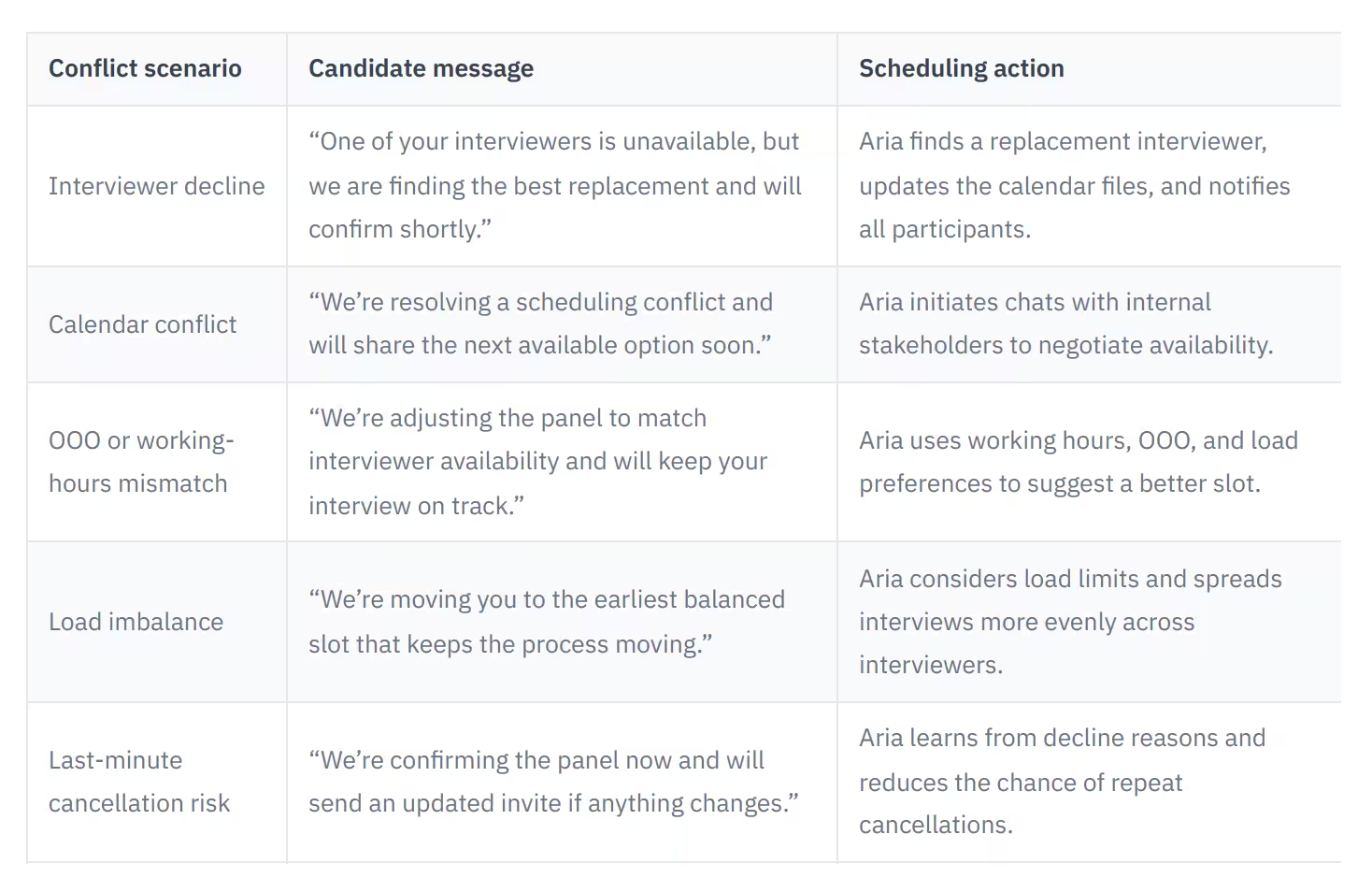
This is the difference between reactive scheduling and recruiting operations. Instead of asking a coordinator to rebuild the loop, Guide keeps the workflow moving inside the ATS context, with visibility and control still in the recruiter’s hands.
Key Points
- Aria can find replacement interviewers after a decline.
- Aria can initiate internal chats to negotiate availability during conflicts.
- Guide gives RCs and recruiters control and visibility without leaving the ATS workflow.
How do I improve candidate experience during interview scheduling?
Candidate experience improves when scheduling feels fast, clear, and low effort. The best scheduling process tells candidates what is happening, what to expect next, and how to recover if plans change.
Start with a clean confirmation flow. The candidate should receive the interview time, interviewer details, and a clear path for rescheduling if needed. Then add reminders that are brief and useful, not noisy. Guide’s automation focus is especially relevant here because it reduces the manual work that slows down coordination, which helps recruiters respond faster and keep candidates informed.
A strong experience also depends on fewer surprises. If interviewer availability is already constrained, the candidate should only see valid options. If a conflict appears later, the update should be handled automatically and communicated quickly. That is how scheduling stops feeling like a bottleneck and starts feeling like part of a well-run hiring process.
Key Points
- Clear confirmations and easy rescheduling paths improve candidate experience.
- Fewer surprises and faster updates reduce candidate uncertainty.
- Automated coordination helps recruiters focus on higher-value candidate communication.
Step-by-step workflow for preventing reschedules
The most reliable workflow starts before the candidate books and ends only after the panel is confirmed. Guide’s scheduling defaults and Aria’s automation make that sequence practical for high-volume recruiting teams.
- Set organization defaults for interview length, working hours, and buffer time, according to support.guide.co.
- Apply load limits so no interviewer is overbooked or stacked back-to-back.
- Sync interviewer preferences, including OOO status and time zone changes.
- Trigger scheduling when the candidate reaches the interview stage.
- Let Aria find valid slots and propose the best panel combination.
- If an interviewer declines, let Aria search for a replacement and notify everyone. 7. Send the candidate a confirmation that includes the updated time and next steps.
Mini case study: one recruiting team using Guide reduced reschedule rates from 12% to 4% after tightening scheduling defaults, enforcing buffers, and letting Aria handle decline recovery. Their recruiting coordinator described the new workflow as, “I approve the options Aria gives me, and the panel gets fixed before the candidate ever feels the delay.” That is the operational win: fewer manual rebuilds, faster turnaround, and a calmer candidate experience.
Key Points
- Set defaults first, then automate scheduling triggers.
- Use Aria to recover from declines instead of rebuilding the panel manually.
- A tighter workflow can reduce reschedules and improve turnaround times.
FAQ: Interview reschedules and candidate experience
What causes interview reschedules caused by interviewer conflicts?
They usually happen when calendars are not governed by clear defaults, when interviewers are overbooked, or when working hours and OOO status are not kept current. Guide’s load settings are designed to prevent those issues by controlling interview frequency and spacing, according to support.guide.co.
How do I stop interview reschedules caused by interviewer conflicts?
Set default interview lengths, buffers, working hours, and load limits, then let automation handle declines and calendar conflicts. Guide says Aria can find replacement interviewers, update calendar files, and notify everyone when a conflict appears.
How do I improve candidate experience during interview scheduling?
Keep the process fast, predictable, and transparent. Candidates should receive clear confirmations, know who they are meeting, and have an easy way to reschedule without starting over.
Can scheduling defaults be changed for different roles?
Yes. Guide’s defaults act as a baseline and can be overridden at the interviewer or job level, which helps teams adapt scheduling rules for different interview formats.
What should recruiters monitor to reduce reschedules over time?
Track how often interviews are declined, how often panels need replacement interviewers, and whether certain interviewers are repeatedly overbooked. Those patterns show where load balancing or working-hour rules need to be tightened.
Key Points
- Guide defaults can be overridden at the interviewer or job level.
- Aria handles replacement interviewer searches and conflict notifications.
- Candidate experience improves when rescheduling is easy and transparent.
Conclusion
Stopping interview reschedules is mostly a systems problem, not a people problem. When you combine scheduling defaults, load balancing, and automated conflict recovery, you protect interviewer calendars and keep candidates moving through the process with less friction. Guide helps recruiting teams do that with Aria, while keeping recruiters in control of the workflow and the candidate experience.
Key Takeaways
- Guide’s scheduling defaults include interview length, buffer time, preferred working hours, and load balancing rules.
- Max interviews per day, max interviews per week, and avoid-consecutive-interviews settings help prevent interviewer overload.
- Aria can find replacement interviewers, update calendar files, and notify everyone when a decline or conflict occurs.
- Candidate experience improves when confirmations are clear, rescheduling is easy, and updates happen quickly.
- Scheduling defaults can be overridden at the interviewer or job level for different hiring needs.